


Beauty Camera Selfie Makeup
4.637.00 Reviews
App Specs
- Version
- 1.7.7_20260226
- Updated On
- License
- Free
- Downloads
- 1,000,000+
- Developer
- Avn Global Application
- Categories
- Beauty
- Platform
- Android, iOS
Screenshots
 Analysis by AppCompare
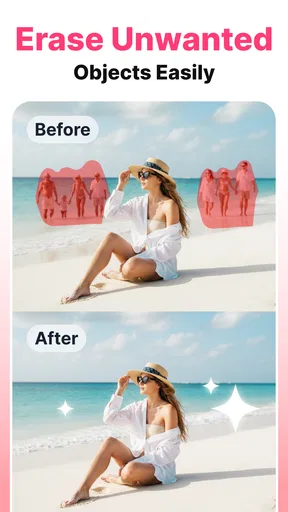
I judge a beauty camera less by how many effects it promises than by whether it helps me make a photo I still like once the novelty wears off. Beauty Camera Selfie Makeup is aimed at quick selfie touch-ups, with beauty and makeup tools alongside background removal. That combination gives it a practical niche: it can help polish a portrait without sending me straight into a full photo editor. I would treat it as a convenient creative tool, though, not as a substitute for careful lighting or a professional retouching workflow.
What the free starting point means
The app is free to install, and the age rating is Everyone, so trying it is a relatively straightforward way to see whether its approach suits your photos. There are also in-app purchases, listed from $2.99 to $124.99 per item. I would separate those two facts when deciding whether it is good value: the free entry point lets you explore, while the purchase range means some parts of the experience may come at a cost. I would check what a particular purchase includes in the app before paying rather than assuming every tool is free.
That distinction matters if you only edit a selfie now and then. For occasional use, a free app can be worth keeping around even if you never buy anything. If you expect to rely on it regularly, take a moment to see whether the tools you actually want are accessible without a purchase. The top of the listed range is substantial enough that I would not make a purchase casually or on the assumption that it unlocks a specific feature; the exact value depends on the item shown at checkout.
Where its tools can save time
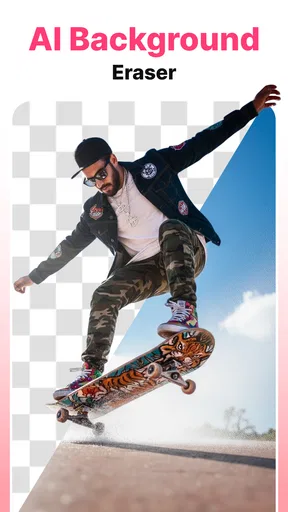
The appeal here is the mix of portrait-focused beauty effects and a background remover. Those jobs often send people between separate apps: one for makeup-style adjustments, another for cutting out a subject, and perhaps a third for finishing the image. Keeping the key tasks together can make a simple edit less fussy. It is most useful when the photo is already decent and you want to make a few targeted changes, not when you need to repair a badly lit or out-of-focus shot.
For example, I might take a quick portrait before meeting friends, decide the background is distracting, and want a light beauty adjustment before sharing it. A sensible workflow is to make the background decision first, then review the face edits against the new composition. Removing a busy backdrop can change the balance of the image; a makeup effect that looked subtle against the original scene may become more noticeable once the subject stands out. Checking the whole picture after each stage helps keep the result believable.
Another useful habit is to compare the edited image with the original before saving or sharing. It is easy to judge a close-up face in isolation and miss that smoothing, color, or makeup has drifted away from the lighting in the rest of the photo. I would make one change at a time and stop as soon as the photo looks more like the version I intended, rather than treating every available adjustment as something that needs to be used.
How I would choose between it and other editors
Compared with a basic camera app, a beauty-focused editor is a better fit when I want to refine a portrait after taking it or experiment with a makeup look. Compared with a general-purpose photo editor, its stated emphasis is narrower and more directly aimed at selfies. That can make it a convenient first stop for a quick personal image, but it is not automatically the best choice for detailed color work, elaborate compositing, or a project where I need precise control over every part of the frame.
Worth Reading Before You Choose

EA SPORTS FC Mobile 26 Is a Bigger Football Game, but It Takes Time

Flipboard Shows What News Apps Must Do Beyond the Feed

Switching to Android Auto Means Rethinking Your Driving Routine

Google Calendar Makes a Crowded Week Easier to Manage

Ludo King Makes the Most of the Minutes Between Plans

Baby Panda World Brings Quick Play to Modern Phones, but Its Game Library Feels Busy
The background-removal tool is a particular reason to try this app if cutouts are part of your routine. Still, the usefulness of any cutout depends on the photo: a clear subject against a simple background is an easier starting point than hair or clothing blending into a similarly colored scene. If a clean edge is important for a product image, graphic, or professional profile, I would inspect the result closely and use a more specialized editor if the outline needs careful correction. A quick tool is most valuable when its output is good enough for the purpose, not simply because it is fast.
Small decisions that improve the result
For a natural-looking portrait, I would begin with the least noticeable adjustment and build from there. Makeup effects are easier to judge at normal viewing size than when zoomed in, and skin edits can look more intense on a phone screen than they will in a small social post. I would also keep the original photo until I am happy with the edited copy. That gives me a straightforward way to backtrack if the final image feels too processed or the background cutout does not suit the composition.
Think about the destination before editing, too. A casual selfie for a private chat may call for a different finish from a profile image that people will see repeatedly. If the picture is meant to look like you on an ordinary day, restrained changes are usually the safer choice. For playful makeup experimentation, stronger effects may be exactly the point. The useful question is not whether an effect is impressive on its own, but whether it fits the image and the reason you are sharing it.
I also would not use a beauty tool to compensate for every photo problem. Moving toward a window, turning toward softer light, or choosing a less cluttered background can improve a selfie before editing begins. That is especially helpful when facial shadows or uneven colors make makeup effects look inconsistent. The app can assist with presentation, but taking a better source photo often gives any editor more to work with.
Who is likely to get the most from it
I can see this being useful for someone who takes selfies for social posts, wants to try makeup shades digitally, or occasionally needs a portrait with less visual distraction behind it. It also suits people who prefer a focused beauty app over learning a broad editing suite for a handful of routine changes. Avn Global Application develops it, and its beauty-first purpose makes the most sense for casual portraits rather than general photography.
On the other hand, I would skip it if I mainly edit landscapes, need detailed professional retouching, or want a dedicated tool for complex background selections. It may also be a poor fit for anyone who wants to avoid in-app purchases altogether unless the free tools meet their needs. The practical way to decide is to try a photo you commonly edit, identify which controls you can use without paying, and judge the result at the size where you expect people to see it.
For Android users, the listed minimum operating-system requirement is 7.0, and the current version is 1.7.6_20260203. The app has a 4.7 average from around 3.3 thousand ratings, with over 500 thousand installs. Those figures suggest it has attracted a sizeable audience, but I would still base my decision on whether its workflow and available tools suit my own photos. A high average does not tell me whether a particular paid item is worth its price for my needs.
A practical value check before committing
My approach would be to start with one ordinary selfie, not a carefully staged portrait. Try the edits you expect to use, check whether the background tool handles the subject cleanly, and see whether the result still feels like your own image. Then look at the purchase options only if you have found a specific limitation that a paid item appears to address. This keeps the decision grounded in your actual use instead of the temptation to unlock everything.
It is also worth asking how often you will make this kind of edit. If the answer is rarely, free access may be enough and the app can simply be an occasional option. If you edit selfies often, the convenience of having beauty adjustments and background removal in one place may matter more, but only if the tools you want are available at a price you find reasonable. I would not pay just because a tool exists; I would pay only when it solves a repeat problem better than the alternatives I already use.
Overall, I see Beauty Camera Selfie Makeup as a convenient, portrait-oriented option for quick personal edits, with its strongest case being the combination of selfie styling and background removal. I would recommend giving it a try if those are jobs you actually do, while keeping expectations sensible about the difference between quick enhancement and detailed editing. Start free, check the cost of any specific purchase before committing, and skip it if your work calls for more precise control than a casual beauty camera is designed to provide.
First Impressions and User Interface
When I first opened the app, I was greeted with a sleek and intuitive interface that made navigation a breeze. The icons are self-explanatory, so you won't find yourself getting lost in a sea of features. Everything you need is right at your fingertips, which is a blessing when you’re trying to get the perfect selfie in a hurry.
Features That Stand Out
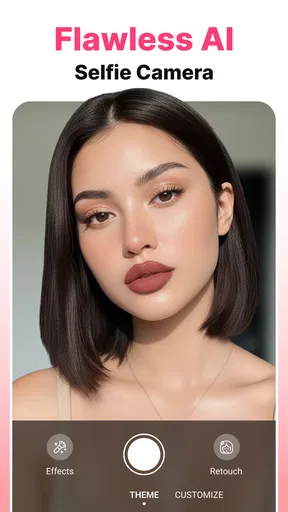
The beauty camera app is packed with features that go beyond the basic filters you’re used to. It includes real-time beauty effects that adjust to your face as you move, ensuring you look fabulous from every angle. I mean, who doesn’t want that?
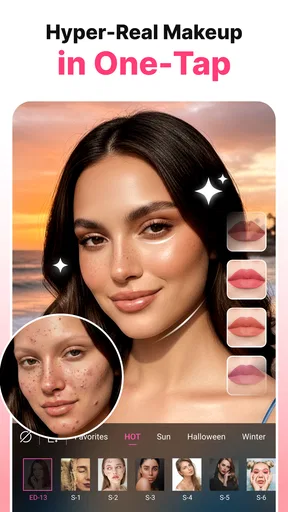
One of the standout features is the makeup tool. You can literally try on different shades of lipstick, blush, and eyeshadow—without any commitment. It's like having a personal makeup artist that fits in your pocket. And the best part? The shades are surprisingly realistic!
Editing Tools and Customization
For those of us who like to have a bit more control, the app offers a robust set of editing tools. You can adjust everything from brightness and contrast to more advanced tweaks like teeth whitening and skin smoothing. And if you’re really feeling creative, there are options for adding stickers and text to your photos.
What I love most is the level of customization. You can save your favorite settings, so you’re always just one tap away from your go-to look. It’s perfect for those days when you want your selfies to have a consistent vibe.
Sharing and Connectivity
Once you’ve perfected your selfie, sharing it is a breeze. The app seamlessly connects with all your favorite social media platforms. Whether you’re posting to Instagram, Snapchat, or Facebook, you can do it directly from the app. It’s incredibly convenient, especially if you’re in a hurry to show off your new look.
The User Experience
One thing I noticed is how smoothly the app runs. I didn’t experience any lag or crashes, which is a huge plus. It’s clear that a lot of thought has gone into optimizing the app for different devices and operating systems.
The app also includes a handy tutorial for beginners. So, if you’re not super tech-savvy, don’t worry—you’ll get the hang of it in no time.
Final Thoughts
Overall, the app is a must-have for anyone who loves taking selfies. It’s user-friendly, packed with features, and makes you look amazing with minimal effort. Whether you’re a selfie newbie or a seasoned pro, this app has something for everyone.
So, if you’re ready to up your selfie game, give it a try. You might just find yourself wondering how you ever lived without it!
Pros
- User-friendly interface for quick edits.
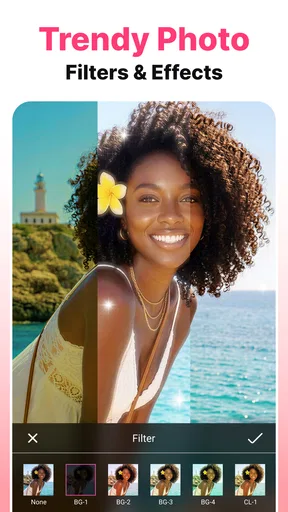
- Variety of filters enhance photo quality.
- Real-time makeup effects are realistic.
- Lightweight app
- saves device storage.
- Frequent updates with new features.
Cons
- Ads can interrupt editing sessions.
- Limited features in free version.
- Requires internet for some effects.
- Occasional bugs in older devices.
- Premium features are pricey.
FAQs for Beauty Camera Selfie Makeup
What features does Beauty Camera Selfie Makeup offer?
Beauty Camera Selfie Makeup provides a range of features designed to enhance selfies effortlessly. Users can apply virtual makeup, smooth skin, adjust facial features, and add filters to photos. The app also includes tools for editing lighting and brightness to create the perfect shot. It offers both automatic and manual editing modes.
Is Beauty Camera Selfie Makeup free to use?
The app is free to download and offers basic features at no cost. However, it includes in-app purchases for premium filters and advanced editing tools. A subscription may be required to access the full suite of features without restrictions, which can enhance the overall user experience.
How does the app protect user privacy?
Beauty Camera Selfie Makeup prioritizes user privacy by not storing any photos or data without explicit consent. The app may request access to your camera and photo library, but this is purely for functionality. Users should review the privacy policy and settings to manage permissions and ensure data security.
Are there any limitations when using Beauty Camera Selfie Makeup?
While the app offers a wide array of features, some advanced tools are only accessible through a subscription or one-time purchases. Additionally, performance may vary depending on the device, with older models potentially experiencing slower processing speeds. Users should ensure their device meets the app's technical requirements.
Can Beauty Camera Selfie Makeup be used offline?
Certain features of Beauty Camera Selfie Makeup can be used offline, such as basic editing tools and previously downloaded filters. However, some functionalities, like cloud storage access and downloading new effects, require an internet connection. Users should plan accordingly to maximize the app's capabilities.


